Use case · Lawful monitoring practice
Monitor without the fine or the blocked rollout
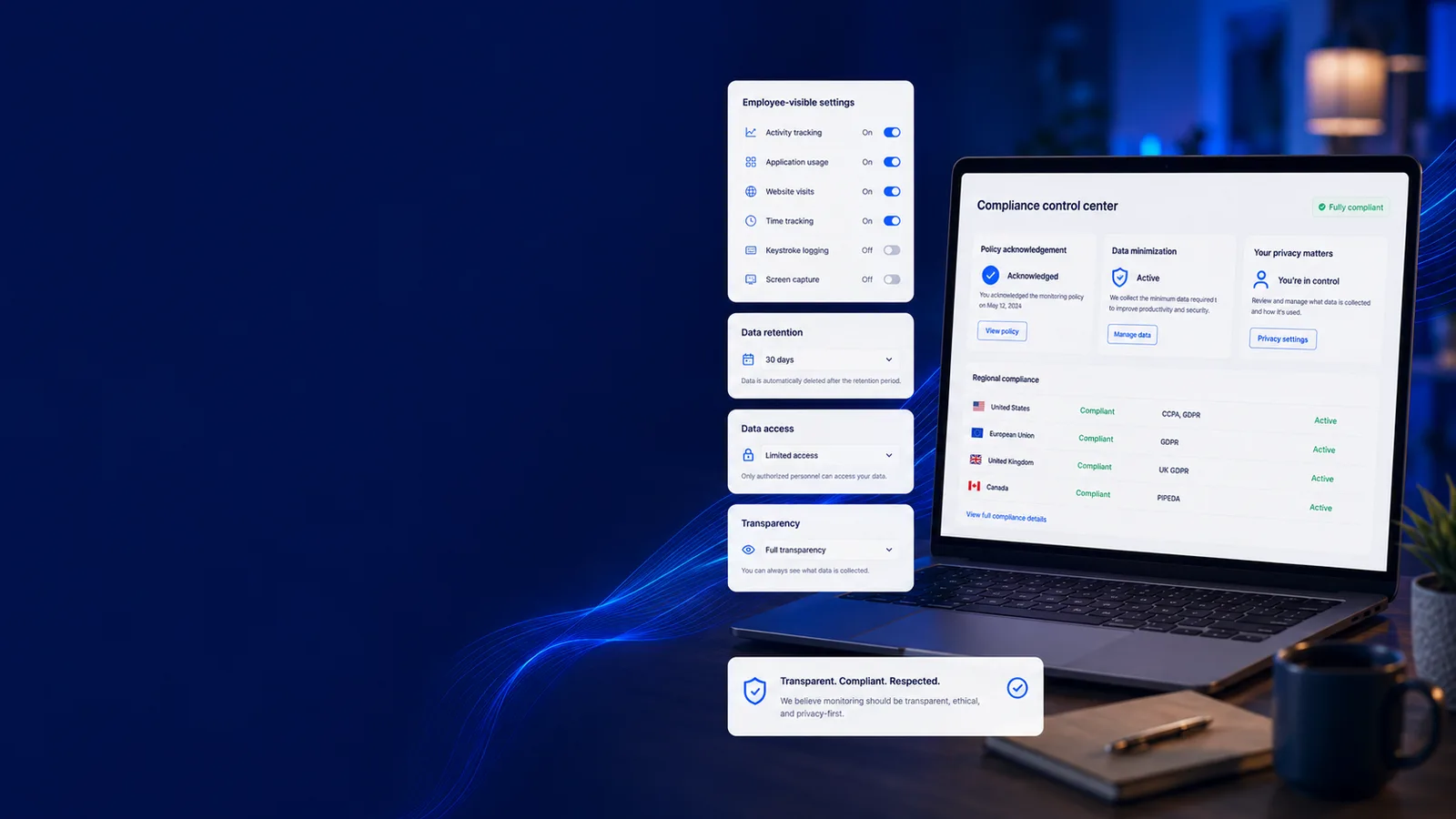
A works council can stop a rollout, and a paragraph in a handbook will not restart it. Versioned consent, a scope the engine enforces, retention that expires, and a record of who looked.
Free for two seats, no card.
- Start from the jurisdictionRead what the local regime expects, notice, consent basis, works-council duties, before choosing what to capture.
- Configure the minimum that answers the questionCapture policy per team and per region, with per-app deny-lists. The narrowest scope that answers your question is also the one that is hardest to challenge.
- Record consent and tell peopleConsent is captured against a policy version and the transparency view opens, so what people were told is producible later, for a named person on a named date.
- Keep the appeal route openDisputes reach a human, accesses are logged on a hash chain, and the evidence pack assembles what an auditor will ask for.
Monitor legally & stay compliant
The controls a regulator, a works council or a court will ask about
Every line here opens the screen it happens on. Judge the job on what it puts in front of a manager, not on the sentence describing it.
How it works
Standing up a defensible monitoring programme
- 1
Start from the jurisdiction
Read what the local regime expects, notice, consent basis, works-council duties, before choosing what to capture.
- 2
Configure the minimum that answers the question
Capture policy per team and per region, with per-app deny-lists. The narrowest scope that answers your question is also the one that is hardest to challenge.
- 3
Record consent and tell people
Consent is captured against a policy version and the transparency view opens, so what people were told is producible later, for a named person on a named date.
- 4
Keep the appeal route open
Disputes reach a human, accesses are logged on a hash chain, and the evidence pack assembles what an auditor will ask for.
A policy document vs. a programme that is wired in
workmonitor.vsPolicy-on-paper
6differences, worked through below
Consent
With WorkMonitor
A record naming the person, the date and the policy version, and re-consent when the policy changes.
Policy-on-paper
A clause in a handbook, unversioned, and impossible to produce for a specific person on a specific date.
Transparency
With WorkMonitor
A transparency view of everything collected, per person, available without them asking, which is the first thing a works council wants to see.
Policy-on-paper
The tool is described in an all-hands. Nobody can see their own data.
Contesting a decision
With WorkMonitor
A dispute route with a right to human review, built for Article 22 and EU AI Act Article 26 expectations.
Policy-on-paper
Raise it with your manager, who is the person the data was collected for.
Over-broad capture
With WorkMonitor
Blocked at capture time by the policy engine, and deny-listed applications never reach the wire.
Policy-on-paper
Discovered in an audit, months after the setting was changed.
Who accessed the data
With WorkMonitor
A hash-chained data-access log, produced for the auditor and visible to the subject, which is what closes the question rather than reopening it.
Policy-on-paper
Unknown, and unknowable after the fact.
Operating in a new country
With WorkMonitor
Written guidance for 32 jurisdictions covering what the local regime expects of workplace monitoring.
Policy-on-paper
A legal review that starts from scratch, or a rollout that quietly ignores the question.
Everything inside Trust & Compliance
- Consent management
- Employee transparency ("What We See")
- Capture controls / policy engine
- Scope Sentinel
Ask AI
Ask AI about your monitoring posture
Answers describing the configuration as it stands. This is operational guidance about your own settings, not legal advice about your obligations.
Pick a question above and WorkMonitor AI will answer from your team's real numbers.
The status meeting, already written
Status is normally assembled by asking. Here it is already: hours, activity, attendance and risk on one board, for one person or the whole company. Set the thresholds once and it tells you who needs you.
Who runs this
Teams that have to answer to a regulator
Where you operate
Start from the jurisdiction you operate in
- GermanyThe works council holds a veto, and a productivity dashboard is enough to trigger it.
- FranceConsult the CSE first. Skipping it is the criminal offence of obstruction.
- United KingdomThe ICO's 2023 monitoring guidance is the operative document, and it expects a DPIA.
- United States (federal)Federal law is permissive; the real constraints are state law and the NLRA.
- NetherlandsWorks council consent, and the regulator treats screenshots as disproportionate by default.
- CaliforniaEmployees have full CCPA rights since 2023, including deletion and correction.
Straight answers
The questions we would ask in your position
Every answer here is the one you would get on a call. Open as many as you like; they stay open, so two can be held side by side.
No product can do that, and any vendor saying otherwise is selling you a problem. Lawfulness depends on your purpose, your legal basis, your jurisdiction and your consultation duties. What this does is provide the controls those regimes ask about, versioned consent, transparency, appeal with human review, retention limits, an auditable access record, so the programme you design can be evidenced rather than merely asserted. The per-country guides describe what each regime expects, and they are guidance, not legal advice.
Typically: what is captured and why, how narrow the scope is, what employees can see about themselves, how somebody objects, how long data is kept, and who can look at it. Each of those maps to a feature here rather than to a paragraph, which shortens the conversation considerably, because the answer can be demonstrated.
Through the data lifecycle tooling: DSAR handling, erasure and retention windows are built in, with bulk export for portability. The relevant design decision is that deny-listed applications never generated data in the first place, so the smallest DSAR is the one with the least to disclose.
Capture policy is per team and per region, which is what makes that practical. The same deployment can capture screens in one country and nothing but activity categories in another. The 32 jurisdiction pages set out what each regime expects, and the differences are usually about notice, basis and consultation rather than about the technology.
Scope Sentinel and the capture policy engine refuse capture outside the configured scope, and configuration changes land on the hash-chained audit trail. The threat model that matters here is not the outside attacker but the well-meaning administrator with a deadline.
Keep going
The jobs next to this one
Same record, read for a different question. Each one opens the page written for that job.
- Capture screenshots on your termsA randomised cadence, exclusions applied on the device, retention that expires, and the consent record and appeal route that keep the programme standing.
- Catch insider threats earlyEgress signals, anomaly detection and integrity checks on a hash-chained trail that records the investigators too, so the finding survives being examined.
- Prove work with certificatesA finalized invoice mints a signed certificate the client checks for themselves. Selective disclosure proves the work without handing over the work.
Take these with you
The software is the easy part of a rollout
Here is what we would send a manager doing one for the first time: how to read a productivity number, what to say to a remote team before anything is installed, and a policy you can adopt as written.
Point it at one team for a week.
Create the account, put the agent on a handful of desks, and leave it alone. On Friday you read the week instead of reconstructing it: hours against their projects, focus and idle per person, and the timesheets already filled in.
Free for two seats. No card, and no sales call to sit through.